

In 2026, content cannot simply be published and left to rank on its own. It must be dynamic. You need to analyze performance, measure results, and continuously optimize for missing search intents and additional keywords.
This guide walks you through exactly how to do that using a content improvement suite built directly into WordPress, with real Google Search Console data driving every decision.
I’m Max, Head of SEO at WP SEO AI. Today I’m going to show you how to use our Content Improvement Suite to actually improve your content and make it rank for the long term. Let’s jump right in.
Where to find the Content Improvement Suite
Inside your WordPress dashboard, navigate to Optimization and then click on Pages. That brings you into the Content Improvement Suite, where all your Google Search Console data is displayed: clicks, CTR, impressions, average position, and more.
How to identify which content to optimize
The workflow starts with identifying which published content has already begun ranking. Here is how to approach it:
- Filter by the month you published your content. For example, check everything published in May.
- Apply the SEO AI Post filter to narrow the list to only the posts created or updated during that period.
- Review the list of posts that have started to rank.
- Select the content pieces you want to measure and click Audit Selected.
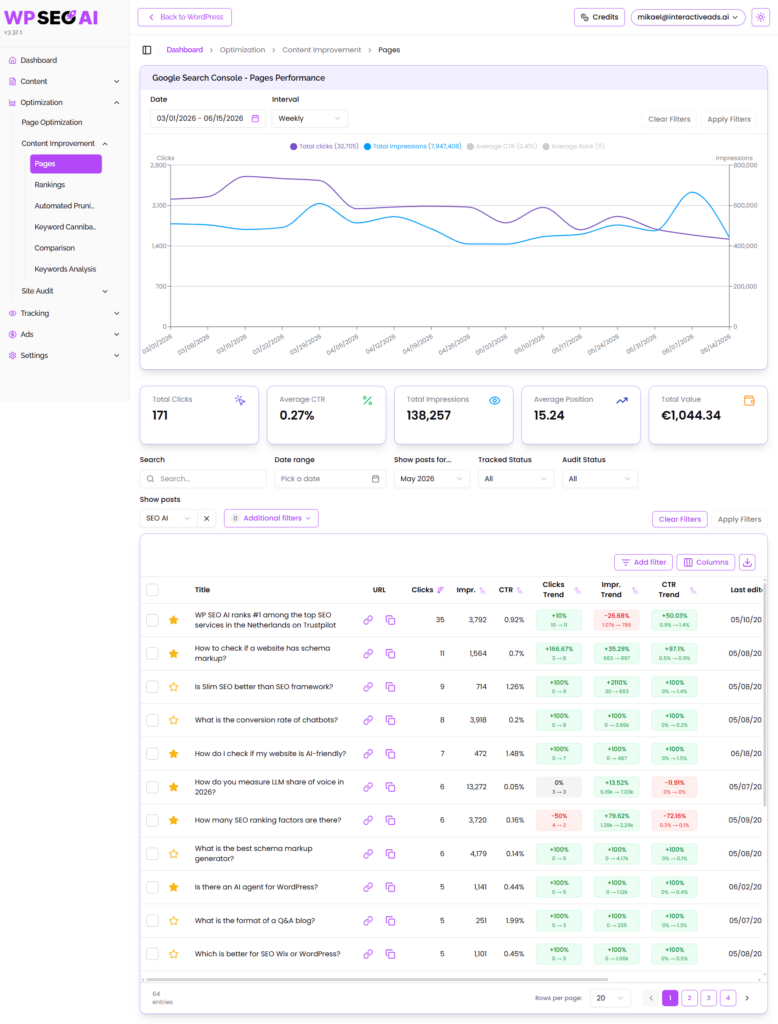
Once you click Audit Selected, the tool sends those pages into a measurement queue. It checks their performance against real competitors using actual SERP data and real organic performance data. The result is a detailed analysis with actionable suggestions for what you can actually improve on each page.
Reading and applying the AI-generated suggestions
Let me walk you through a real example. I published a post in May titled How Do I Check If My Website Is AI Friendly. It has already started ranking, and I can see that clearly from the click strength score when I open it up. I can also see exactly which keywords it is ranking for.
When the audit runs, it generates a set of AI-powered suggestions based on the SERP analysis. These suggestions are not hallucinated or pulled from nowhere. They come directly from analyzing the top three competitors ranking for your target keywords. For my post, the suggestions included things like:
- Adding a platform-by-platform comparison table of AI criteria and crawler behavior
- Adding a named AI-Friendliness scoring framework
- Adding a quick-start audit checklist
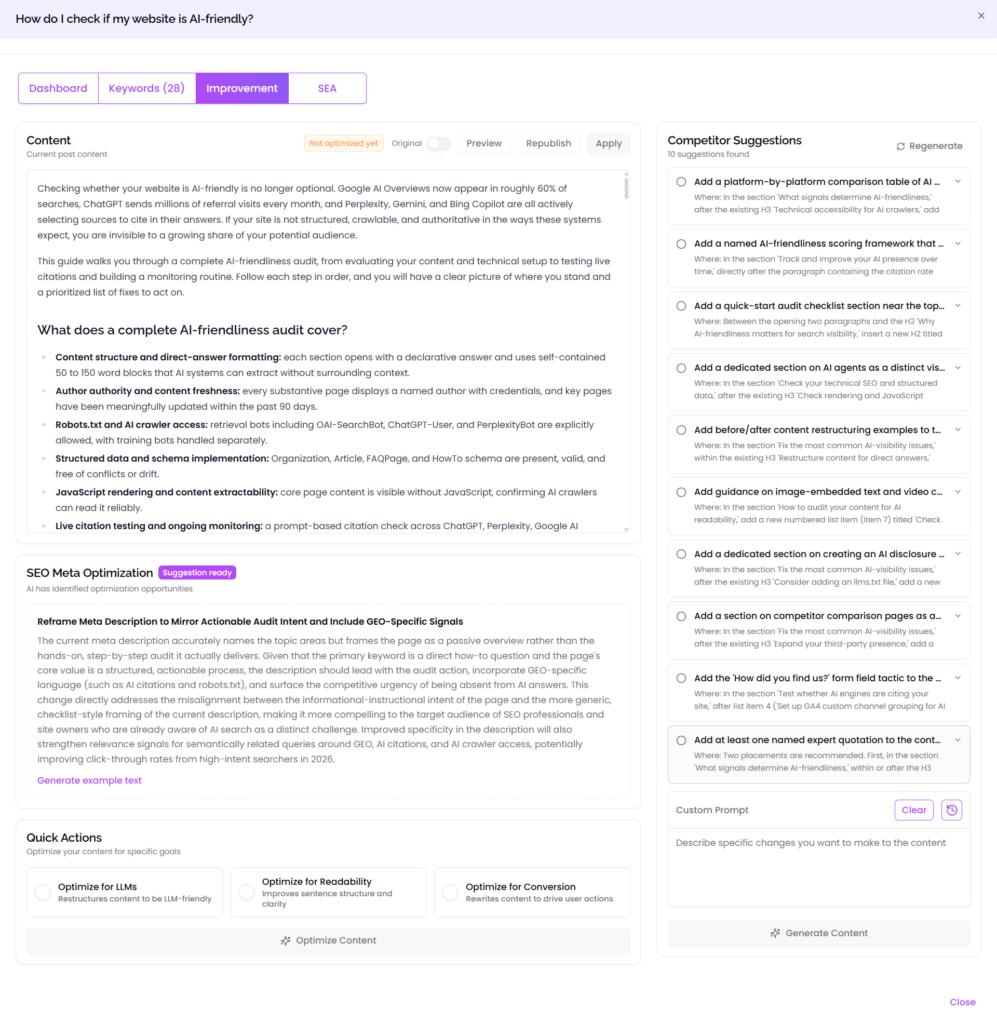
Each of these fills a genuine content gap: something your competitors are already covering that your page is missing. To apply the suggestions you want, simply select them and click Generate Content.
Comparing original and optimized content
After the content is generated, you can toggle between the original and optimized versions directly inside the tool. For my post, the optimized version added entirely new sections that were not present before, including:
- What a complete AI-Friendliness audit covers and why it matters
- How the major AI platforms differ in how they select sources
These additions are meaningful, substantive improvements that directly address what the top-ranking competitors are already covering. Over time, this process fills your content gaps piece by piece, so that your content eventually becomes the most comprehensive and helpful result in its category.
Publishing the optimized content
Once you are happy with the optimized version, click Apply. Because you are working directly inside WordPress, the updated content is published to your website immediately. There is no exporting, no copy-pasting, no additional steps. The beauty of a native WordPress integration means your improvements go live instantly.
Adding your own expertise on top of the optimization
The AI-generated improvements are a strong foundation, but there is always room to add your own perspective and expertise. For my AI-friendliness post, I recorded a video walkthrough of a Chrome extension called Glippy that I found genuinely useful for auditing AI readability. I added that video directly to the relevant section of the post, specifically the section covering how to audit your content for AI readability.
Adding a video like this does several things at once:
- It enhances the quality and helpfulness of the content for real readers
- It adds a unique element that competitors are unlikely to replicate
- It signals to search engines that the page offers richer, more engaging content
The process is simple: create the video, embed it in the relevant section, save, and wait for it to go live. You now have a stronger, more helpful, and more differentiated content piece.
Why this workflow works for long-term rankings
The core principle behind this entire approach is that content improvement should be driven by real data, not guesswork. Every suggestion generated by the Content Improvement Suite comes from actual SERP analysis of your top competitors. You are not adding content randomly. You are filling specific gaps that the market has already validated as important.
By combining that data-driven foundation with your own expertise, original media, and editorial judgment, you end up with content that is both algorithmically well-optimized and genuinely useful to your audience. Run this process consistently across your content library, and each piece gradually becomes the best result in its category.
I hope this gave you a clear picture of how the Content Improvement Suite works and how to put it into practice. If you have any questions or would like to start optimizing your own content, I look forward to working with you very soon.
This content was generated with the help of AI and it may contain mistakes