
Search Ads
Boost organic winners
Turn strong SEO pages into paid search campaigns when extra visibility makes sense.
Monitor ad performance
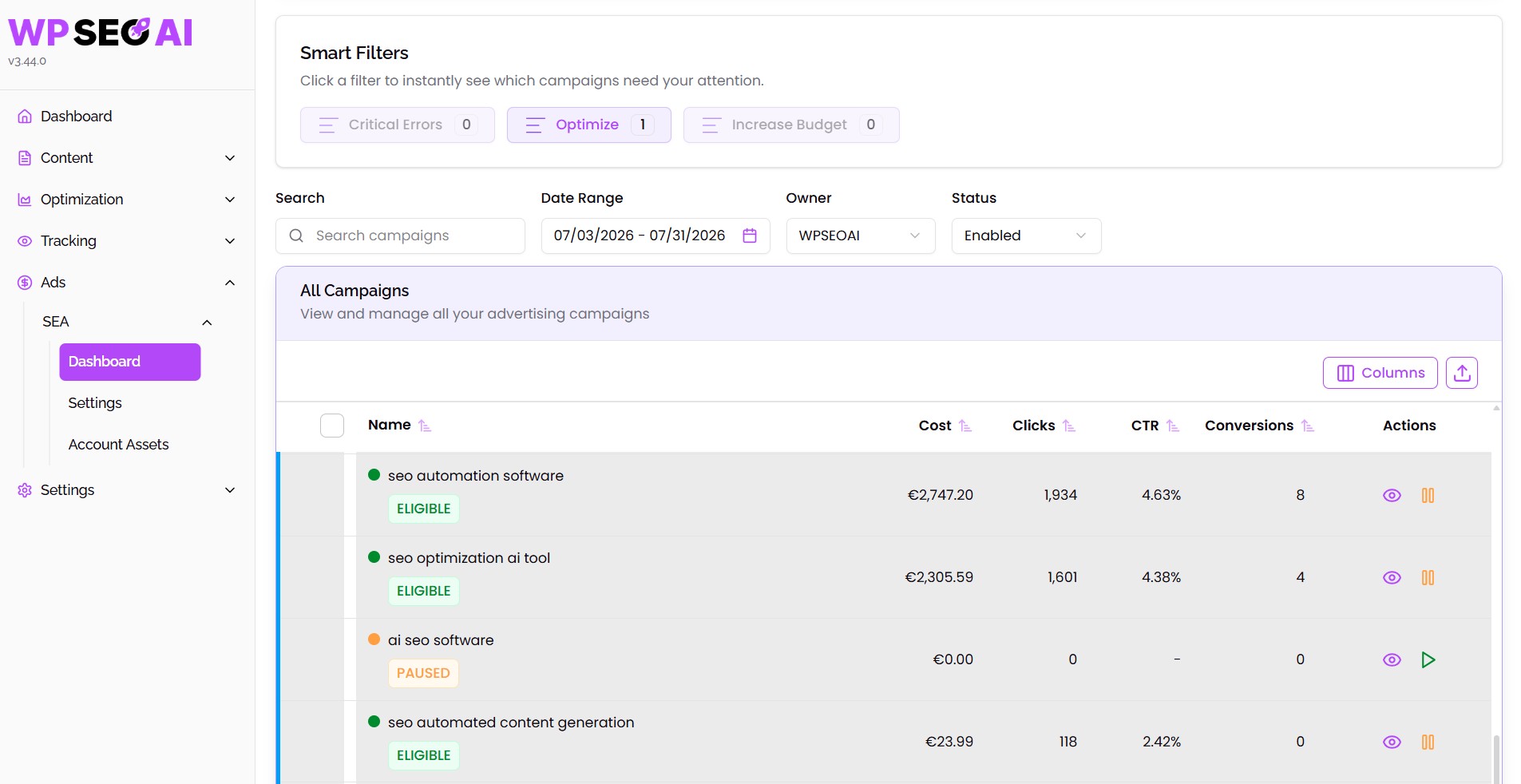
Track impressions, clicks, conversions, budget, and campaign performance over time.
Use smart filters
Spot campaigns that need optimization, budget changes, fixes, or keyword updates.
Create recommended campaigns
Generate suggested Search Ads campaigns from high-potential content pages.
Customize ad assets
Edit headlines, descriptions, keywords, sitelinks, callouts, images, and campaign settings.
Connect paid and organic
Align Google Ads with the pages, keywords, and content already performing on your website.
The reason
Why Search Ads matter
Why it matters
Turn SEO performance into paid growth
What you get
A simpler way to run Google Ads
Uses cases
How to use Search Ads
Review your Search Ads dashboard
Use smart campaign filters
Optimize active campaigns
Customize ads by keyword
Configure your Search Ads foundation
Boost high-performing content
Accept, reject, or adjust campaigns
You are currently viewing a placeholder content from YouTube. To access the actual content, click the button below. Please note that doing so will share data with third-party providers.
More InformationIn Detail
What exactly is Search Ads?
Search Ads is a Google Ads management feature inside WP SEO AI. It helps you create, monitor, and optimize paid search campaigns from your WordPress environment. The feature connects paid performance with your organic content data, so you can boost high-performing pages, review recommended campaigns, manage ad assets, update keywords, and track results without relying only on the Google Ads interface.
Benefits - your unfair advantages using this feature:
Boost proven pages
Save campaign setup time
Align SEO and Ads
Improve campaign control
Spot optimization needs
Track paid performance
Verdict
Final thoughts
WP SEO AI’s Search Ads feature is built for teams who want paid search to support their organic strategy, not sit in a separate silo.
Instead of starting every campaign manually in Google Ads, you can use your existing page and keyword performance as the foundation. The feature helps you identify strong pages, generate campaign recommendations, customize ads, and monitor results from your WordPress workflow.
This makes Search Ads easier to manage, easier to connect with SEO, and easier to use as a growth lever when your content is already showing potential.
FAQ
Everything you need to know about Search Ads
Does Search Ads connect with Google Ads?
Can I create campaigns from existing content?
Can I edit ad copy?
Can I track campaign performance?
What are smart filters?
Can I set up tracking and assets?
Who benefits most from this feature?
Book a demo
See the platform in action
Our experts are happy to give you a full tour through our platform. Book your spot now!
All features
Explore every feature in one place. Browse by use case, from AI content creation to tracking, optimization, search ads, and settings, and find all the features we use to make you successful in Search.
AI Writer
Create helpful content for your readers and future customers.
AI Blog Editor
Use our AI to edit content live with prompts inside the Gutenberg and Classic Editor.
AI Image Generation
Helping you to instantly craft beautiful, custom tailored visuals.
Content Calendar
Drag your blog drafts into the calendar to auto-schedule or publish them immediately.
Idea Generation
Generate the content ideas necessary to reach topical authority in your industry.
Internal Linking
Pave the way and establish a smart internal navigation for users and search engines.
Keyword Research
Discover long-tail keywords with low competition and high probabilty to rank #1.
Topical Map Generator
Organize, expand, and monitor your content clusters with AI-powered precision.
Translate Content
Use traditional WordPress translation plugins together with WP SEO AI to translate our blogs.
AI Visibility Tracking
Track your brand's visibility across leading LLMs like ChatGPT, Gemini, and Google’s AI Overviews.
AI Bot Tracking
See which AI bots crawl your website and identify pages to optimize for AI visibility.
Competitor Tracking
Spy on your competitors' SEO strategy and identify quick wins in order to outrank them.
Conversion Tracking
Connect your Google Analytics account with WP SEO AI and track conversions.
Keyword Analysis
Find all the keywords you are ranking with in Google and how they perform over time.
Search Visibility Dashboard
Tracks and shows you all search metrics you need to measure success.
Technical SEO Audit
Analyse your page speed or other issues and get actionable insights to improve your technicals.
Content Improvement
Analyse your indexed content, get improvement ideas and execute them with one click.
Content Pruning
Detect and clean low performing content from your website to improve overal site quality.
Keyword Cannibalization
Strengthen the authority of your most important pages by detecting and solving keyword overlap.
Lead Form
Capture more leads with personalized, high-converting forms built directly into your blog content.
LLM Optimization
Discover the fan-out-queries behind every search in AI and optimize for them.
Mass Content Edit
Mass-Edit your content, add internal links or make your content more in-depth with one click.
Universal Page Optimization
Optimize all your pages based on data from Search Console, Google Ads & Google Analytics.
Configuration
Transform our platform into a content teammate who truly understands your business.
Knowledge Bases
Build a pool of expert knowledge for your AI to reduce hallucinaiton and improve accuray in writing.
Prompt Library
Save, organise, and reuse your best-performing prompts across all major functions in the platform.