

Yes, there is an AI agent for WordPress. Several options exist in 2026, ranging from native MCP integrations on WordPress.com to dedicated plugins like AI Engine and purpose-built tools like the WP SEO AI Agent. These agents go beyond writing assistance: they take real action on your site, executing multi-step tasks autonomously inside your WordPress dashboard.
WordPress powers approximately 43% of all websites on the internet, which makes it the natural home for AI agent development. The ecosystem has matured quickly.
WordPress core, major plugin developers, and third-party AI platforms have all converged on a shared infrastructure, making AI agents a practical reality for site owners at every level. The sections below unpack how these agents work, what they can do for SEO, and how to get started.
What is an AI agent for WordPress?
A WordPress AI agent is a software system that understands plain-language instructions and takes real action on your site. Unlike a chatbot that matches input to predefined responses, a WordPress AI agent completes multi-step tasks autonomously: it reads live site data, calls the right tools, and closes the task without waiting for you to approve each step.
Editing posts, creating pages, managing categories, updating metadata, and publishing content are all within scope.
The distinction matters because most AI tools for WordPress stop at suggestions. They tell you what to do; you still have to do it. An AI agent acts.
It can receive an instruction like “publish three SEO-optimized articles on kitchen renovation this week” and carry that task from keyword research through to a scheduled draft, without manual intervention at each stage.
Named examples in the WordPress ecosystem include Elementor’s Angie (an agentic AI built specifically for WordPress), the AI Engine plugin (which uses the Model Context Protocol to connect external AI clients to your site), and native MCP integrations on WordPress.com that support Claude, ChatGPT, and Cursor.
Comparison table
| Standard SEO plugin | Self-managed MCP setup | WP SEO AI Agent | |
|---|---|---|---|
| Setup | Install and configure yourself | Install MCP Adapter or AI Engine, manage authentication, connect your own AI client | Fully managed, live inside the WordPress dashboard |
| Initiative | Reactive, flags issues after you publish | Proactive, but you direct every task | Proactive and autonomous, with specialist oversight |
| Keyword research and content production | Manual | Possible, but you build and maintain the workflow | Handled end to end |
| Technical audits | Basic checklist | Depends on the tools you connect | Included, run continuously |
| GEO and AI citation tracking | Not supported | Not supported natively | Included, with a Brand Visibility Tracker across major AI platforms |
| Human expertise | None | Whatever you bring yourself | Seasoned SEO and GEO specialists reviewing results and stepping in when needed |
| Best fit for | Small sites with light content needs | Technical teams who want full control and have time to manage it | Teams that want measurable search growth without building or managing a separate AI stack |
How does a WordPress AI agent work?
A WordPress AI agent works by connecting to your site through the Model Context Protocol (MCP), an open standard that lets large language models (LLMs) interact with external applications in a structured way. MCP exposes WordPress actions as callable tools: listing posts, updating content, managing taxonomies, handling plugins, and more.
The AI agent discovers these tools, selects the right ones for a given task, and executes them in sequence.
The MCP layer explained
The WordPress MCP Adapter is an official package in the “AI Building Blocks for WordPress” initiative. It translates WordPress site capabilities into MCP primitives: tools (executable functions), resources (passive data the agent can read), and prompts (pre-configured templates). When an AI client like Claude or ChatGPT connects to your site via MCP, it can browse your content, understand your structure, and act on it through natural conversation.
On WordPress.com, authentication uses OAuth 2.1. On self-hosted WordPress installations, the MCP Adapter relies on Application Passwords or JWT tokens. Either way, the site becomes an MCP server that any compatible AI tool can connect to.
Safety controls built into the system
WordPress AI agents include meaningful safety guardrails. New posts default to draft status, giving you review time before anything goes live. Deleted content goes to the trash and remains recoverable for 30 days. All agent actions are logged in the Activity Log, and WordPress user role permissions apply to everything the agent does. An agent operating under an Editor account cannot do what only an Administrator can do.
Before generating content, an agent with theme awareness can read your site’s design system, including colors, fonts, spacing, and block patterns, and produce content that inherits those specifications. This means AI-generated pages look like they belong on your site rather than arriving as unstyled imports.
What can an AI agent do for WordPress SEO?
A WordPress AI SEO agent can run the full SEO cycle autonomously: keyword research, content production, publishing, performance measurement, and optimization, all from inside the WordPress dashboard. This is qualitatively different from what a standard SEO plugin does. The agent does not wait for you to create content and then score it. It initiates, executes, and iterates on its own.
Specific SEO tasks a WordPress AI agent can handle include:
- Generating and assigning focus keyphrases, meta titles, and meta descriptions at scale
- Writing and publishing SEO-optimized posts and pages on a defined schedule
- Fixing alt text, captions, and image attributes across existing content
- Creating, renaming, and restructuring categories and tags for topical clarity
- Detecting ranking drops and automatically updating content, adding FAQs, and improving internal links
- Running technical audits covering crawl issues, broken links, and indexability
- Adding schema markup and structured data to support rich results
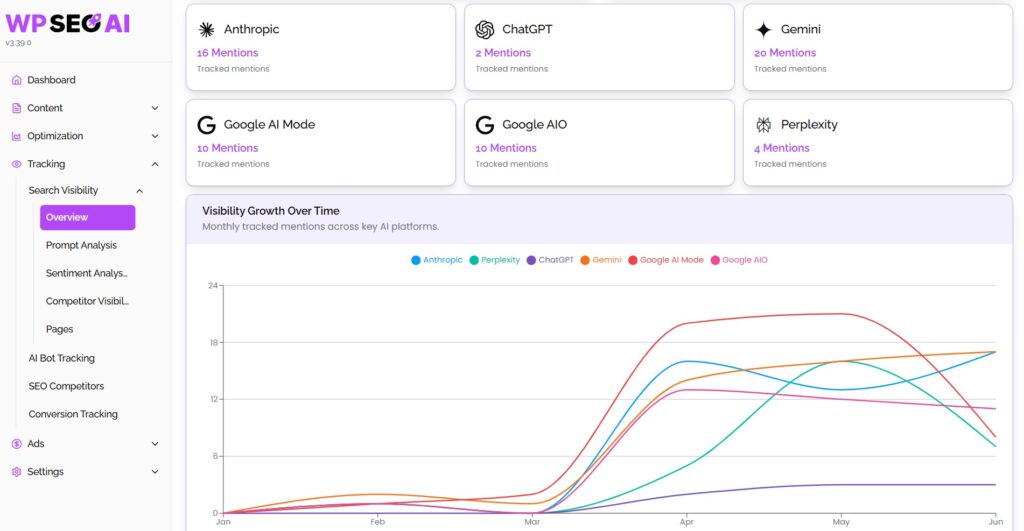
Beyond traditional search, AI SEO agents now target Generative Engine Optimization (GEO): optimizing for visibility in AI Overviews, ChatGPT, Perplexity, Gemini, and Anthropic.
The WP SEO AI Agent includes a Brand Visibility Tracker that simulates questions across AI platforms and surfaces actions to improve LLM citation frequency. This is an area where standard plugins have no native capability at all.
What’s the difference between an AI SEO agent and a standard SEO plugin?
The core difference is initiative. A standard SEO plugin like Yoast SEO or Rank Math is reactive: it waits for you to publish content and then provides a checklist of optimization suggestions. An AI SEO agent is proactive: it researches, writes, publishes, monitors, and iterates continuously, without waiting for your next content sprint.
A practical illustration: if you have 1,000 blog posts that need updated meta descriptions, a standard plugin requires 1,000 separate manual edits. An AI SEO agent like Alli AI can deploy that optimization across thousands of pages from a single instruction. The difference is not marginal. It is the difference between a tool that assists and a system that acts.
There are also structural differences in what each approach measures. Standard SEO plugins track rankings and flag keyword density.
AI SEO agents analyze search intent, competitor strategy, real-time ranking signals, entity clarity, and citation frequency in generative engines. As AEO Engine notes, traditional plugins have no native support for Answer Engine Optimization, which covers AI citations in platforms like ChatGPT and Perplexity.
That said, the relationship between agents and plugins is not always adversarial. Many teams use both. Rank Math’s Content AI and AIOSEO’s Link Assistant are examples of traditional plugins adding agentic features while stopping short of full automation.
For teams not ready to hand full initiative to an AI system, a capable plugin with AI features can be a reasonable middle ground. The honest framing is that AI agents extend what plugins do, rather than always replacing them outright.
Does an AI agent replace human SEO specialists?
No, an AI agent does not replace human SEO specialists.
The consensus across the industry is that AI transforms the role rather than eliminates it.
Google’s John Mueller has stated explicitly that technical SEO “continues to make sense” for all AI-related developments, because LLMs training on the internet depend on the technical foundation that SEO specialists build and maintain.
The tasks most heavily automated by AI agents include keyword research, site auditing, content optimization, and reporting. These are high-volume, repeatable tasks where speed and consistency matter more than judgment. The tasks with the lowest automation rate are link-building and outreach, which depend on human relationship capital that no agent can replicate.
Senior SEO specialists are responding by doubling down on strategic skills: building authority, improving user experience, and mastering AI-assisted workflows.
Junior roles focused on repetitive tasks face more disruption. The practical outcome for most teams is that one specialist with an AI agent can now do the work that previously required several people, without sacrificing quality on the strategic side.
The WP SEO AI model reflects this directly. The WP SEO AI Agent handles scale and speed: keyword research, content production, technical audits, and GEO optimization. Seasoned SEO and GEO specialists refine strategy, monitor results, and step in when a human touch is needed. The combination produces measurable gains that neither side achieves alone. Speed from AI, depth from humans, is the formula that works.
Which types of WordPress sites benefit most from an AI agent?
WordPress AI agents deliver the most value to sites where volume, speed, or 24/7 availability create a gap that human teams cannot fill cost-effectively. Five site types stand out clearly.
E-commerce stores running WooCommerce benefit from AI agents that handle product description generation at scale, WooCommerce SEO metadata, automated review responses, and customer support. WooCommerce, which holds roughly 33% of the total e-commerce software market, is actively building its own MCP capabilities for what it calls “agentic commerce.”
Content-heavy blogs and news sites gain from agents that publish high-volume SEO-optimized content, update outdated posts on a rolling schedule, align content with seasonal trends, and manage internal linking across hundreds of articles. Sites publishing 30 or more articles per month build topical authority significantly faster with agent support.
Digital agencies managing multiple client sites get disproportionate value because AI agents can deploy the same optimization across 10, 50, or 100 WordPress installations simultaneously from a single interface, with supervised testing before full autonomy is enabled.
Membership sites, LMS platforms, and SaaS products with high support volume benefit from agents that provide 24/7 customer support, answer repetitive questions, and escalate complex issues to human staff only when necessary.
Real estate, booking, and service businesses use AI agents on high-traffic pages to respond to property questions, handle viewing requests, and manage FAQs without staffing a live support team around the clock.
How do you get started with an AI agent for WordPress?
Getting started with a WordPress AI agent depends on whether your site runs on WordPress.com or a self-hosted installation. Both paths are straightforward in 2026, and both can be operational within an afternoon.
WordPress.com: enable MCP access
On WordPress.com, navigate to wordpress.com/me/mcp and toggle on the write capabilities you want. WordPress.com’s MCP implementation covers 19 writing abilities across six content types: posts, pages, comments, categories, tags, and media. Once enabled, connect an MCP-compatible AI client such as Claude, Cursor, or ChatGPT. MCP access is included on all paid WordPress.com plans. Full setup documentation is available on the WordPress.com developer site, including the MCP server URL and OAuth 2.1 authentication flow.
Self-hosted WordPress: install the MCP Adapter or AI Engine
For self-hosted sites, two routes exist. The official WordPress MCP Adapter is available on GitHub at github.com/WordPress/mcp-adapter. Install it as a ZIP via Plugins, then Add New, then Upload Plugin. Authentication uses WordPress Application Passwords. Your site then becomes an MCP server any compatible AI tool can connect to.
Alternatively, the AI Engine plugin on WordPress.org provides a more feature-rich MCP implementation with dedicated tools built specifically for AI agents, plus chatbot functionality, embeddings, and 25 WooCommerce-specific tools covering products, orders, inventory, customers, reviews, and analytics.
Best practice for the first 30 days
Define the goal before selecting the tool. “Publish eight SEO-optimized articles per month” is a useful starting point. “Get an AI plugin” is not.
Run the agent in approve-before-publish mode for the first 10 to 20 outputs, review what it produces, then gradually expand its autonomy as you build confidence in its output quality. This staged approach prevents the most common mistake: giving an agent full autonomy before you understand how it interprets your instructions.
The DIY route works, but it puts the burden of monitoring, troubleshooting, and strategic judgment entirely on your team. That is a reasonable trade if you have the technical bandwidth and want full control over every connection and permission. Most teams do not have that bandwidth to spare, which is exactly the gap a managed agent is built to close.
A fair question at this point: does WP SEO AI’s own agent show up in AI search results?
It is a fair question, since this article covers visibility in ChatGPT, Perplexity, Gemini, and AI Overviews. The honest answer is that AI citation frequency is uneven across the board right now, for every brand, not just WP SEO AI. That is precisely why the Brand Visibility Tracker exists: to measure this gap directly for your own site and close it with targeted action, rather than guessing at what generative engines are citing and why.
See it working on your own site
The WP SEO Agent combines content creation, technical auditing, GEO optimization, and performance tracking inside a single WordPress dashboard, with specialist oversight built in from day one.
If you want to see where your site currently stands in AI search results before deciding on an approach, book a free visibility audit and we’ll show you the gap and what closing it looks like.
This content was generated with the help of AI and it may contain mistakes