
Competitor Tracking
Monitor your competitors’ SEO strategy, uncover keyword gaps, and find opportunities to outrank them.
Track competitor domains
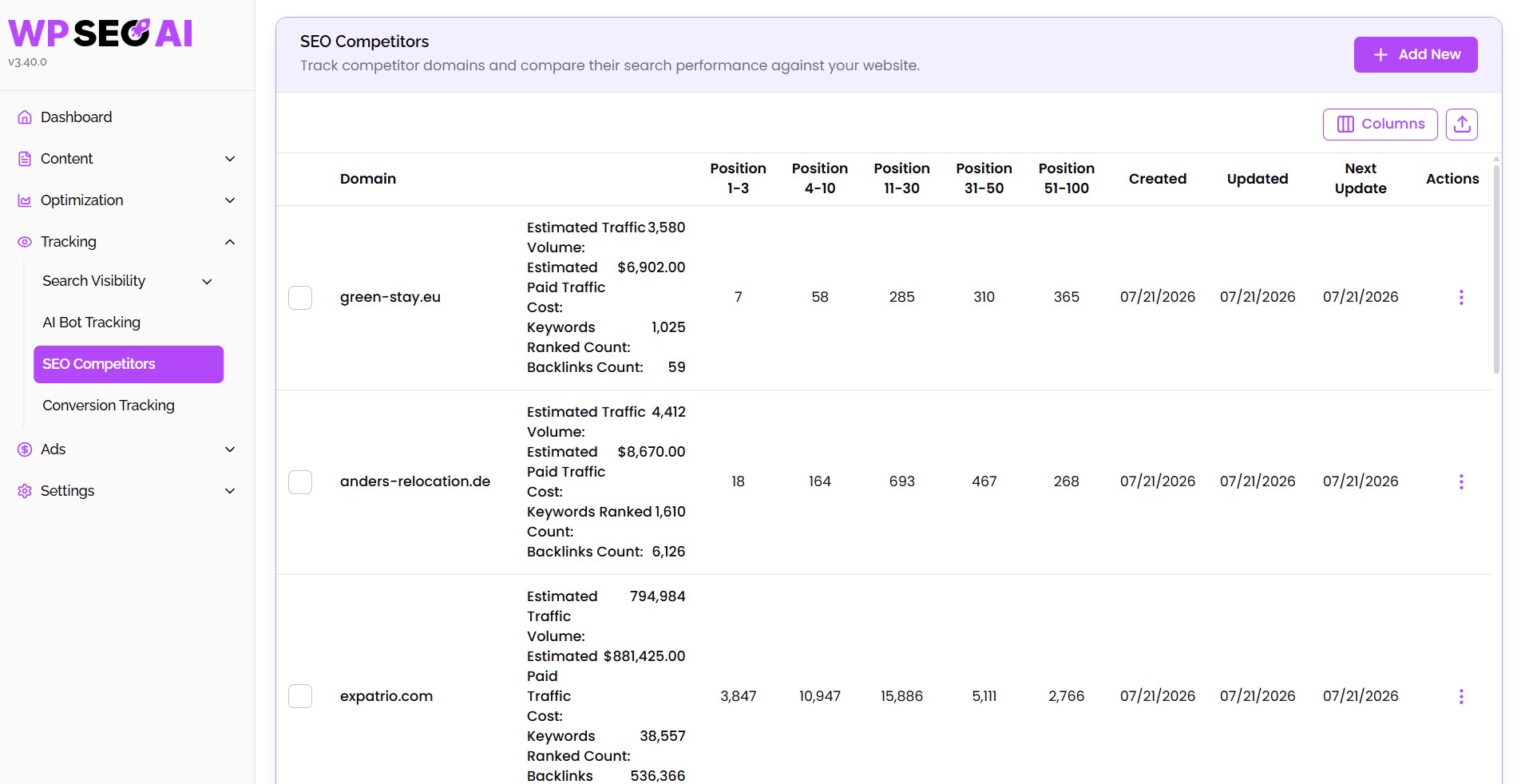
Add competitor websites and monitor their SEO performance in your selected market.
Find keyword gaps
Discover relevant keywords your competitors rank for, but your website does not.
Compare search performance
See how your rankings, traffic and keywords compare to competitors.
Analyze ranking trends
Review historical visibility, traffic value, and keyword movement over time.
Turn insights into content
Use competitor keyword data to generate stronger content.
Prioritize quick wins
Identify high-value opportunities where your website can realistically compete and grow.
The reason
Why Competitor Tracking matters
Why it matters
Stop guessing why competitors outrank you
What you get
A clear view of your competitive landscape
Uses cases
How to use Competitor Tracking
Add competitor domains
Review competitor performance
View historical trends
Explore keyword-level insights
Run gap analysis
Generate competitive content
You are currently viewing a placeholder content from YouTube. To access the actual content, click the button below. Please note that doing so will share data with third-party providers.
More InformationIn Detail
What exactly is Competitor Tracking?
Benefits - your unfair advantages using this feature:
Reveal competitor strategies
Discover content gaps
Prioritize better opportunities
Monitor market movement
Create content faster
Verdict
Final thoughts
WP SEO AI’s Competitor Tracking is built for teams who want to compete with more clarity and less guesswork.
Instead of only watching your own rankings, you can see what competitors are doing, where they are winning, and which opportunities are still open. From keyword gaps and traffic trends to competitor-informed content creation, this feature turns competitive research into a practical growth workflow.
When your competitors improve, you can see it. More importantly, you can act on it.
FAQ
Everything you need to know about the Competitor Tracking feature
Can I track multiple competitors?
Can I choose the country I want to track?
What competitor data can I see?
Can I compare my website against a competitor?
Can I create content from competitor insights?
Who benefits most from this feature?
Book a demo
See the platform in action
Our experts are happy to give you a full tour through our platform. Book your spot now!
All features
Explore every feature in one place. Browse by use case, from AI content creation to tracking, optimization, search ads, and settings, and find all the features we use to make you successful in Search.
AI Writer
Create helpful content for your readers and future customers.
AI Blog Editor
Use our AI to edit content live with prompts inside the Gutenberg and Classic Editor.
AI Image Generation
Helping you to instantly craft beautiful, custom tailored visuals.
Content Calendar
Drag your blog drafts into the calendar to auto-schedule or publish them immediately.
Idea Generation
Generate the content ideas necessary to reach topical authority in your industry.
Internal Linking
Pave the way and establish a smart internal navigation for users and search engines.
Keyword Research
Discover long-tail keywords with low competition and high probabilty to rank #1.
Topical Map Generator
Organize, expand, and monitor your content clusters with AI-powered precision.
Translate Content
Use traditional WordPress translation plugins together with WP SEO AI to translate our blogs.
AI Visibility Tracking
Track your brand's visibility across leading LLMs like ChatGPT, Gemini, and Google’s AI Overviews.
AI Bot Tracking
See which AI bots crawl your website and identify pages to optimize for AI visibility.
Conversion Tracking
Connect your Google Analytics account with WP SEO AI and track conversions.
Keyword Analysis
Find all the keywords you are ranking with in Google and how they perform over time.
Search Visibility Dashboard
Tracks and shows you all search metrics you need to measure success.
Technical SEO Audit
Analyse your page speed or other issues and get actionable insights to improve your technicals.
Content Improvement
Analyse your indexed content, get improvement ideas and execute them with one click.
Content Pruning
Detect and clean low performing content from your website to improve overal site quality.
Keyword Cannibalization
Strengthen the authority of your most important pages by detecting and solving keyword overlap.
Lead Form
Capture more leads with personalized, high-converting forms built directly into your blog content.
LLM Optimization
Discover the fan-out-queries behind every search in AI and optimize for them.
Mass Content Edit
Mass-Edit your content, add internal links or make your content more in-depth with one click.
Universal Page Optimization
Optimize all your pages based on data from Search Console, Google Ads & Google Analytics.
Search Ads
Create unique long-tail ads and optimize your own ads with smart filters.
Configuration
Transform our platform into a content teammate who truly understands your business.
Knowledge Bases
Build a pool of expert knowledge for your AI to reduce hallucinaiton and improve accuray in writing.
Prompt Library
Save, organise, and reuse your best-performing prompts across all major functions in the platform.