
Internal Linking
Build smarter internal links
Automatically add relevant internal links to existing and future blog posts.
Control your keywords
Customize which keywords should or should not be linked across your website.
Prioritize key pages
Choose which URLs should be prioritized when multiple matching pages exist.
Manage anchor text
Maintain full control over anchor text, destination pages, and linking behavior.
Scale without manual work
Apply internal links across hundreds of posts without editing every article manually.
Improve SEO structure
Help search engines discover, understand, and value your content more effectively.
The reason
Why Internal Linking matters
Why it matters
Turn scattered content into a connected system
What you get
A scalable way to connect your website content
Uses cases
How to use Internal Linking
Activate the feature
Review your link database
Set rules and preferences
Apply links across your content
You are currently viewing a placeholder content from YouTube. To access the actual content, click the button below. Please note that doing so will share data with third-party providers.
More InformationIn Detail
What exactly is the Internal Linking feature?
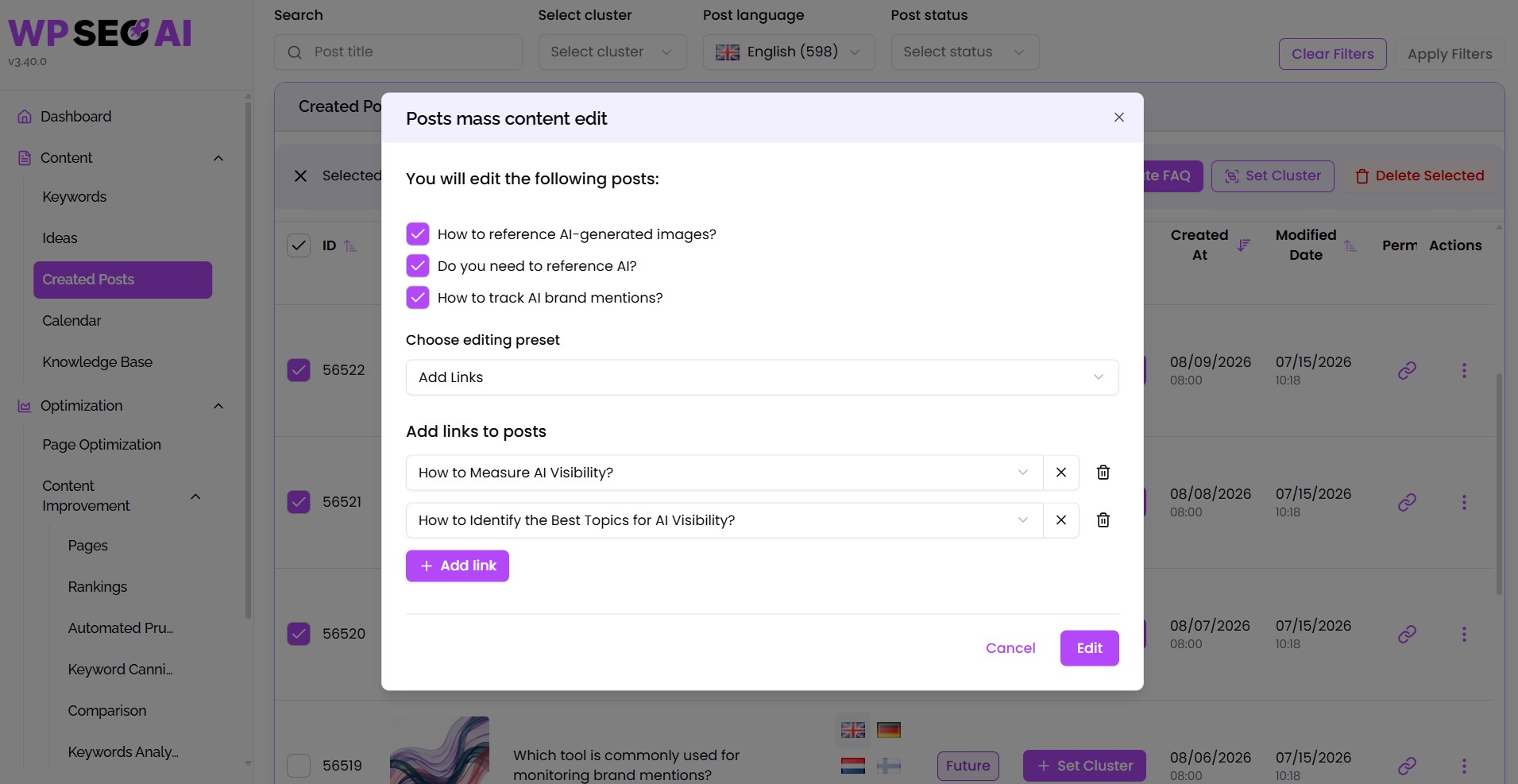
The Internal Linking feature, powered by WP SEO AI’s Smart Link Structure, is an AI-assisted automation tool that helps you build a better internal link network across your WordPress website. It scans your website content, identifies contextual keyword mentions, and connects them to the most relevant target pages. These targets can include blog posts, category pages, landing pages, service pages, or product pages.
Benefits - your unfair advantages using this feature:
Improve crawlability
Help search engines discover, crawl, and understand your pages more efficiently.
Strengthen topical authority
Connect related content together and make it easier for search engines to recognize your expertise around specific topics.
Pass authority strategically
Guide link equity from strong pages to supporting pages that need more visibility.
Save manual work
Scale internal linking across hundreds of posts without spreadsheets, manual editing, or extra plugins.
Improve user journeys
Guide visitors toward relevant content, helping them explore more pages and stay engaged for longer.
Verdict
Final thoughts
WP SEO AI’s Internal Linking feature is built for teams who want a smarter, more scalable way to manage site structure.
Instead of relying on manual updates, forgotten links, or disconnected articles, you can create a clear internal navigation system that works in the background. Search engines get better signals, users find the right content faster, and your website becomes easier to grow over time.
Whether you are managing a large blog, building topical authority, or improving the SEO foundation of an existing WordPress website, Internal Linking helps you connect the dots.
FAQ
Everything you need to know about the Internal Linking feature
Do I need to add internal links manually?
No. WP SEO AI can scan your existing content and suggest or apply internal links automatically based on your settings.
Can I choose which page a keyword links to?
Yes. When multiple URLs are relevant, you can prioritize the page that should be used as the preferred destination.
Does it work on existing blog posts?
Yes. The feature can be used to update existing articles and can also apply the same internal linking logic to future content.
Can I prevent too many links on one page?
Yes. You can set rules and preferences to avoid over-linking and keep your internal links natural and useful.
Who benefits most from this feature?
Internal Linking is especially useful for WordPress websites with a growing blog, large content library, SEO-focused landing pages, or a strategy built around topical authority.
Book a demo
See the platform in action
Our experts are happy to give you a full tour through our platform. Book your spot now!
All features
Explore every feature in one place. Browse by use case, from AI content creation to tracking, optimization, search ads, and settings, and find all the features we use to make you successful in Search.
AI Writer
Create helpful content for your readers and future customers.
AI Blog Editor
Use our AI to edit content live with prompts inside the Gutenberg and Classic Editor.
AI Image Generation
Helping you to instantly craft beautiful, custom tailored visuals.
Content Calendar
Drag your blog drafts into the calendar to auto-schedule or publish them immediately.
Idea Generation
Generate the content ideas necessary to reach topical authority in your industry.
Keyword Research
Discover long-tail keywords with low competition and high probabilty to rank #1.
Topical Map Generator
Organize, expand, and monitor your content clusters with AI-powered precision.
Translate Content
Use traditional WordPress translation plugins together with WP SEO AI to translate our blogs.
AI Visibility Tracking
Track your brand's visibility across leading LLMs like ChatGPT, Gemini, and Google’s AI Overviews.
AI Bot Tracking
See which AI bots crawl your website and identify pages to optimize for AI visibility.
Competitor Tracking
Spy on your competitors' SEO strategy and identify quick wins in order to outrank them.
Conversion Tracking
Connect your Google Analytics account with WP SEO AI and track conversions.
Keyword Analysis
Find all the keywords you are ranking with in Google and how they perform over time.
Search Visibility Dashboard
Tracks and shows you all search metrics you need to measure success.
Technical SEO Audit
Analyse your page speed or other issues and get actionable insights to improve your technicals.
Content Improvement
Analyse your indexed content, get improvement ideas and execute them with one click.
Content Pruning
Detect and clean low performing content from your website to improve overal site quality.
Keyword Cannibalization
Strengthen the authority of your most important pages by detecting and solving keyword overlap.
Lead Form
Capture more leads with personalized, high-converting forms built directly into your blog content.
LLM Optimization
Discover the fan-out-queries behind every search in AI and optimize for them.
Mass Content Edit
Mass-Edit your content, add internal links or make your content more in-depth with one click.
Universal Page Optimization
Optimize all your pages based on data from Search Console, Google Ads & Google Analytics.
Search Ads
Create unique long-tail ads and optimize your own ads with smart filters.
Configuration
Transform our platform into a content teammate who truly understands your business.
Knowledge Bases
Build a pool of expert knowledge for your AI to reduce hallucinaiton and improve accuray in writing.
Prompt Library
Save, organise, and reuse your best-performing prompts across all major functions in the platform.